
The first version of the dealbreaker system worked exactly the way you would expect a dealbreaker system to work.
You set a minimum safety score. Destinations below it were removed from results. Clean. Simple. A classic filter.
I specced it that way, looked at it on paper, and immediately saw the problem.
A user who sets safety to 85, healthcare to 80, and affordability to 70 is telling me something real about what matters to them. What the first version would tell them back, in many cases, is nothing. Zero results. The product had not found them the perfect city. It had broken itself.
I scrapped the spec before any code was written.
Why elimination is the wrong model
Hard filters feel intuitive. You set a floor, things below the floor disappear, you only see what qualifies. That logic works when the search space is large and the filters are loose. It fails when users set ambitious thresholds, which is exactly what people do when they are making a decision as significant as relocating their family.
The deeper problem is what an empty result teaches. Nothing. The user sees no results and has no idea whether their safety threshold was too high by 3 points or by 30. They have no way to understand the trade-off. The product has given them a dead end instead of a decision.
I have been in enough product reviews where someone defends a bad UX by saying “well, users should set more realistic thresholds.” That is a product manager abdicating their job. The product should meet the user where they are, not where we want them to be.
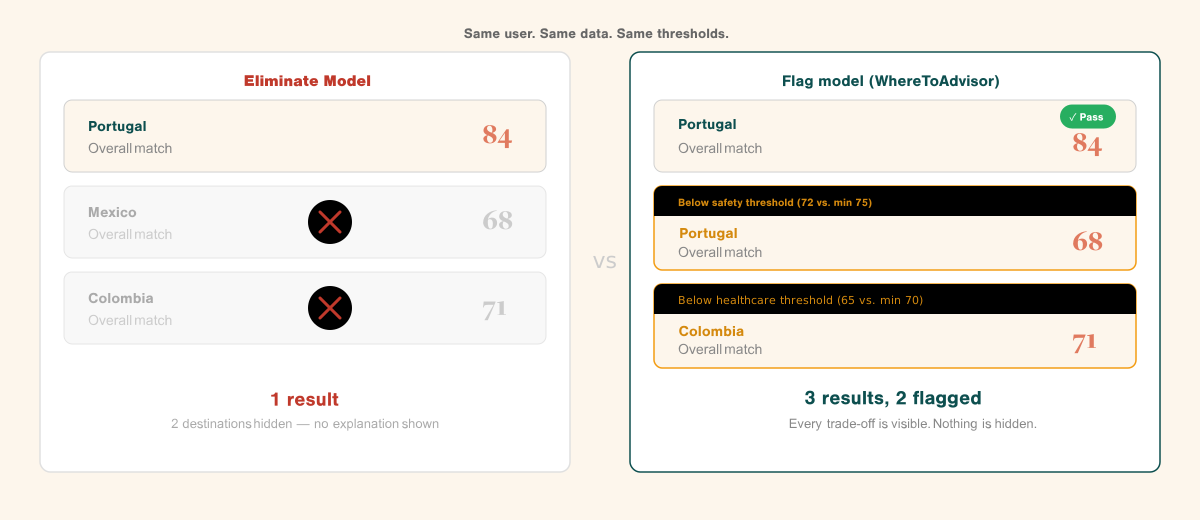
Flag, do not hide
The replacement model starts from a different principle: the user’s best matches always appear. All three of them, regardless of whether they pass every threshold.
A destination that passes all dealbreakers shows normally. A destination that fails one shows with an amber warning and a plain explanation: “Below your safety threshold (72 vs. your minimum of 75).”
This gives the user two things at once: their best matches by overall fit, and a clear accounting of what each match asks them to accept. The result set is never empty. The trade-offs are never hidden.
An empty result set teaches nothing. A flagged result set teaches exactly what the trade-off is.
That distinction matters more than it might seem. Users who see a flagged result and understand why it is flagged are in a position to make an informed decision. Users who see nothing are just frustrated. One of those experiences builds trust. The other loses users.
Context over raw numbers
Fixing elimination was the first problem. The second was that raw numbers mean nothing without context.
A safety score of 75 is a number. It tells you almost nothing about whether that city is safe enough for your family. Is 75 high? Low? What does it feel like to live there?
Every dealbreaker threshold in WhereToAdvisor shows a plain-language label and a one-line description alongside the number. A user setting their safety threshold at 75 sees: “High: Low crime overall. Most expats report feeling safe.” Move it to 90 and it reads: “Very High: Among the lowest crime rates globally. Strong policing, low violent crime.”
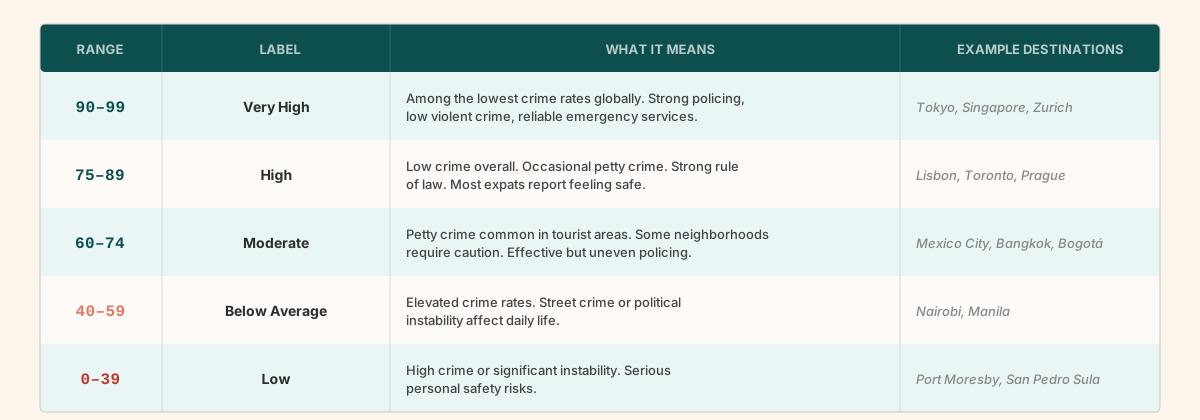
Five bands across all eight facets: Very High, High, Moderate, Below Average, Low. Consistent labels so users build an instinct for what the numbers mean. The label system is small but it changes the decisions users make. People set thresholds more sensibly when they understand what the threshold means in practice.
The hint system
Flag-not-hide and score context solve most cases. But there is one scenario they do not solve: all three top results are flagged.
That should be rare. When it happens, the user needs more than amber indicators. They need to know exactly what to do.
The hint system runs a secondary computation on every threshold change. It asks: what is the minimum adjustment to any single threshold that would clear at least one destination? Then it tells the user exactly what it found.
“If you lower your safety minimum from 85 to 80, Lisbon passes all your dealbreakers.”
The hint names the threshold. Names the destination. Names the exact value. There is also a one-click option to apply the adjustment, with a confirmation step that shows the user precisely what they are trading before it takes effect.
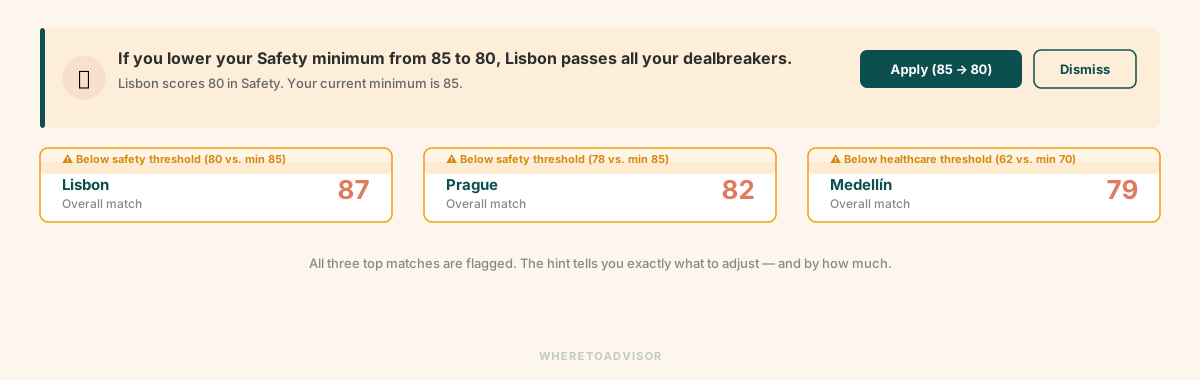
From a builder perspective, this is the feature that keeps users engaged at the moment they would otherwise bounce. An empty result with no guidance is a dead end. A specific, actionable hint is an invitation to keep going.
Building the hint engine was not trivial. It runs on every slider change, computes the minimum delta per category, and returns results in under 200 milliseconds. But the user experience payoff is significant. Nobody quits a product that tells them exactly what they need to do to get what they want.
The broader principle
Flag-not-hide is not just a dealbreaker mechanic. It is a product philosophy that runs through the whole product.
The acceptance facet works the same way. If a city scores low on acceptance for a user’s specific profile, that fact is surfaced, not suppressed. The product does not hide uncomfortable data to keep results looking clean. Users see the trade-off and make their own decision. That is the job: inform, not decide.
Products that hide complexity to simplify the interface consistently obscure the most important information. Flagging is harder to build than hiding. It requires more careful UX, more computation, and more willingness to show users something they might not want to see.
It is almost always the right call.
Next: Six Days. What a product leader building with AI can actually ship, what required human judgment throughout, and what the overnight vibe coding posts leave out.
Read the full series at wheretoadvisor.com/blog.


